



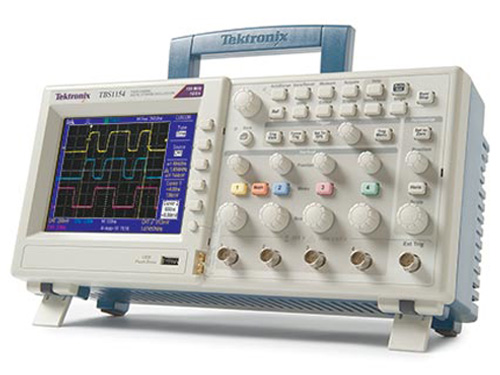
The storage of the TBS1000 series digital oscilloscope provides affordable performance in a compact design. Packed with standard features - including USB connectivity, 16 automated measurements, limit testing, data logging, and context-sensitive help - TBS1000 series oscilloscopes help you do more in less time.
key performance specifications
150 MHz, 100 MHz, and 60 MHz bandwidth models
4-channel models
1 GS/s sampling frequency on all channels
2.5k recording length of points across all channels
advanced triggers, including selectable pulse width and line trigger video
Key features
16 automatic measurements and FFT analysis for simplified waveform analysis
Built in limit test waveform
Automated, extended data logging function
Autoconfiguration and automatic range signal
Built-in context-sensitive help
Sensor verification assistant
User interface in multiple languages
5.7 in. (144 mm) active TFT Color display
Small size and lightweight - Only 4.9 in (124 mm) deep and 4.4 lbs (2 kg)
conectividad
USB 2.0 host port on the front panel for quick and easy data storage
The USB 2.0 port on the back panel of the device for easy connection to a PC or direct printing to a PictBridge® compatible printer
Includes Tektronix OpenChoice® software to connect the bench
Digital accuracy for precise measurements
With up to 150 MHz bandwidth and a maximum sampling rate of 1 GS/s, no other digital storage oscilloscope offers the highest bandwidth and sampling frequency for the price. Tektronix patented sampling technology provides real-time sampling with the indicated sampling frequency on all channels, all the time to accurately capture your signals. Sampling performance is not reduced when using multiple channels.
See all information from other oscilloscopes that may be lost with Tektronix's patented real-time digital sampling
The TBS1000 series oscilloscopes are particularly suitable for meeting the demanding measurement requirements of today. Packed with features and built-in tools, the TBS1000 is easy to learn and easy to operate - ideal for first-time oscilloscope users or experienced veterans. With the same user interface as the Tektronix TDS oscilloscope family, operating a TBS1000 means using the world's most popular oscilloscope platform, with over 500,000 oscilloscopes in operation worldwide.Quickly and easily capture waveforms
To simplify integration with your current curriculum, the TBS1000 also includes an Education Resources CD full of tools to help beginners master the use of an oscilloscope. The TBS1000 offers the tools and performance you need at a price you can afford.
critical tools for device troubleshooting
Advanced triggers - rising/falling edge, pulse width, and video - help quickly isolate your signals of interest. Once you have captured a signal, advanced math capabilities and automated measurements can accelerate your analysis. Quickly perform an FFT or add, subtract, multiply, or manipulate waveforms. Sixteen automated measurements quickly and reliably calculate important signal characteristics such as frequency or rise time, while the built-in limit testing function allows you to easily identify issues in your signal.Quickly perform an FFT with advanced math functions. Designed to make your job easy
The TBS1000 series oscilloscopes are designed with the ease of use and familiar operation that users have come to expect from Tektronix.
manejo intuitivo. The intuitive user interface with reserved channel controls, auto-configuration, and auto-range makes these instruments easy to use, reducing learning time and increasing efficiency.
Help when you need it and where you need it
The context-sensitive help system provides important task-specific information for the task being worked on
The built-in help menu provides important information about the features and functions of the oscilloscope. Help is provided in the same languages as the user interface. Sensor verification assistant
Check your probe compensation before taking measurements with a single button that initiates a quick, easy procedure. Elimit test
Limit test provides a quick Pass / Fail comparison of any active input signal to a user-defined template
The oscilloscope can automatically control the input and output signals to approve or disapprove the results by judging if the input waveform is within predefined limits. Specific actions can be triggered on violation including stopping signal acquisition, halting limit test functions, saving the on-screen image of failed waveform data or to a USB memory device, or any combination of the above. This is an ideal solution for manufacturing or service applications where quick decisions need to be made. flexible data transfer
Data logging allows automatically saving triggered waveforms
The USB port on the front panel allows you to save instrument settings, screenshots, and waveform data instantly. The built-in data logging function means you can set the oscilloscope to save user-specified active waveforms to a USB memory device for up to 24 hours. You can also select the 'infinite' option for continuous waveform monitoring. In this mode, you can save your triggered waveforms to an external USB memory device without a duration limitation until the memory device is full. The oscilloscope will guide you to insert another USB memory device to continue saving waveforms.
Easy PC connectivity
Easily capture, save, and analyze measurement results by connecting to a PC with the USB device port on the back panel and the included copy of OpenChoice communication software for PC. Just drag images of the waveform screen and data into the standalone desktop application or directly into Microsoft Word and Excel. Alternatively, if you prefer not to use the PC, you can simply print the image directly to any PictBridge compatible printer.
Easily capture, save and analyze measurement results with OpenChoice ™ PC communications software. The performance you can count on
In addition to industry-leading service and support, each TBS1000 series oscilloscope comes with a standard 5-year warranty.
Recursos educativos
Each TBS1000 model includes an educational resource CD filled with tools to help beginners master the use of an oscilloscope. The educational resource CD includes two labs and instructor guides, and two primers. The Introduction to Oscilloscope Lab and Instructor Guide explains the basic operation of the oscilloscope complete with practice exercises for classroom environments. The Introduction to Oscilloscope Probes Lab and Instructor Guide explains the fundamentals of probing and how probes can affect measurement quality. The two included primers are the most popular and widely used from Tektronix - Technical Manual for Oscilloscopes and ABC of Probes.
The included educational resources CD is full of tools to help beginners master the use of an oscilloscope.
Presupuesto
All specifications are guaranteed unless otherwise stated. All specifications apply to all models unless otherwise stated.
modelos
TBS1064 TBS1104 TBS1154
Bandwidth of MHz 60 100 MHz 150 MHz
Channels 4 4 4
Sampling frequency on each channel 1.0 GS/s from 1.0 GS/s 1.0 GS/s
Length recording points 2.5k at all time bases
1 The bandwidth is 20 MHz at 2 mV / div
Vertical system - The analog channels
Vertical resolution 8 bits
Input sensitivity range of 2 mV to 5 V / div in all models with calibrated precision adjustment
DC obtain an accuracy of ± 3%, ranging from 10 mV / div to 5 V / div
Maximum input voltage 300 V RMS CAT II; reduced by 20 dB / decade above 100 kHz to 13 Vp-p AC at 3 MHz
offset area
2 mV a 200 mV / div: ± 1,8 V
> 200 mV a 5 V / div: ± 45 V
bandwidth limit of 20 MHz
AC, DC, GND input coupling
Input impedance 1 MW in parallel with 20 pF
Vertical zoom to expand or compress a live or stopped waveform vertically
horizontal system - The analog channels
Tiempo gama base 5 ns a 50 s / div
Base precision time of 50 ppm
horizontal zoom to expand or compress a live or stopped waveform
Input / output ports
USB interface USB port on the front panel of the device port is compatible with USB flash drives USB at the back of the instrument supports connection to a PC and all printers compatible with PictBridge®
interfaz GPIB opcional
Data storage. Non-volatile storage
waveform display reference 2.5K reference waveform storage point and without USB flash drive 2.5K maximum USB flash drive storage size 64 GB waveform with a USB flash drive of 96 or more reference waveforms per 8 MB settings without USB flash drive front 10-panel settings with USB flash drive 4000 or more on the front panel settings per screen images 8 MB with a USB flash drive 128 or more screen images per 8 MB (the number of images depends on the selected file format) Store all data with the USB flash drive of 12 or more and saves all operations for every 8 MB. A single Save All operation creates 3 to 9 files (configuration, image, plus one file for each waveform sample)
acquisition system. acquisition modes
Detection of high-frequency peaks and capture of random interference. Captures spurious as narrow as 12 ns (typical) at all time base settings from 5 μs/div to 50 s/sample data div for example Average waveform average, selectable: 4, 16, 64, 128 single sequence Use the Single Sequence button to capture a single triggered roll sequence acquisition not set at acquisition time bases of > 100 ms/div
firing system
external trigger input included in all models
Trigger modes Auto, Normal, Individual sequence
types of triggers
Edge (rising/falling) Level trigger driven conventional. positive or negative slope on any channel. coupling selections: AC, DC, Noise Rejection, HF Reject, LF video trigger rejection on all lines or individual lines, even/odd or all composite video fields, or broadcast standards (NTSC, PAL, SECAM) by pulse width (or Glitch) trigger of pulse width less than, greater than, equal to, or not equal to, a selectable time limit ranging from 33 ns to 10 s